AI Driven Knowledge base setup for gaming
Learn how gaming companies can create an effective knowledge base to enhance player support and streamline issue resolution.
Tommi Koirikivi, CEO & Co-founder
A well-organized knowledge base helps gaming companies reduce support tickets, resolve issues faster, and provide 24/7 answers to common player problems like account recovery or bug reporting. When paired with the GenAI driven features where the system can automatically surface answers for the players, maintaining and publishing content comes increasingly important.
While GenAI driven Knowledge Base is in use, the companies should also actively keep on eye on what the players are asking and how the system outputs the answers. This information will be crucial for fine-tuning and revealing patterns of what are the players concerns.
Here’s how to get started.
… We also talk about what Bananas 🍌 have to do with GenAI driven Knowledge base.
Key Steps:
- Assign roles: Content creators, editors, and admins manage content and structure. If you’re supporting multiple languages, have translators or proof readers available.
- Organize content: Use categories like “Getting Started”, “Technical Support”, and “Gameplay Guides”. This will help the players to quickly navigate as well as when using AI along with the Knowledge base, the accuracy to the answers increases.
- Create relevant content categories:
- FAQs for quick answers
- Troubleshooting guides
- Gameplay instructions
- Patch notes and rules
- Billing & payment
- Leverage AI: Use tools for smarter search, automated tagging, and personalized recommendations.
- Keep It updated: Regularly refresh content based on player feedback and game updates. Best tools can provide you also suggestions based on the player interactions.
Why this matters:
- Players get instant help, improving their experience.
- Support teams focus on complex issues, saving time. You can also gravitate your focus more towards VIP strategies.
- Instead of showing search results, AI tools make finding answers easy and intuitive.
With the right structure, tools, and regular updates, your knowledge base becomes a powerful resource for both players and support teams.
Steps to set up your knowledge base
Creating a knowledge base takes careful planning and organization. Here’s how gaming companies can build an effective support resource. Depending of the structure and size of the organization, your situation might vary.
The most important thing is to get something for the players as soon as possible. This will then start giving you more ideas what is missing. It’s impossible to have a Knowledge base “done”. Consider it as a living documentation that responses on your behalf, – literally true, when paired with AI to give the answers.
Assign roles and responsibilities
A successful knowledge base starts with a dedicated team. Your roles might look something like this depending the scale and operation.
Role
Responsibilities
Content Creator
Writes articles and FAQs
Technical Editor
Reviews for accuracy and consistency
Knowledge Base Admin
Manages structure and user access
Translator or proof reader
Multilingual content
Organize Content for Easy Access
Structure your knowledge base so players can quickly find the help they need. Use broad categories based on common player issues. Here’s an one example:
- Getting started: Account setup, installation, basic controls
- Technical support: Troubleshooting, system requirements
- Gameplay and mechanics: Guides, features, combat systems
- Account management: Security, payments, and customization
Leverage AI tools to analyze player questions and identify high-priority topics. These insights can help you refine your content categories. With a solid structure in place, the next step is to gather relevant content.
Collect gaming specific content
Focus on creating content that addresses frequent player questions and problems. Here’s a breakdown of key content types:
Content Type
Purpose
FAQs
Quick answers to common issues
Troubleshooting Guides
Step-by-step fixes for technical problems
Gameplay Guides
Detailed instructions with visuals
Updates and Rules
Patch notes and community guidelines
Enhance your articles with visuals like screenshots and videos to make them easier to understand. Keep an eye on support tickets and player feedback to identify missing topics and prioritize new content. Remember that picture tells more than thousand words, players scan for information and visuals brings a huge help. Videos, in some cases, even more.

Using AI and search to improve support
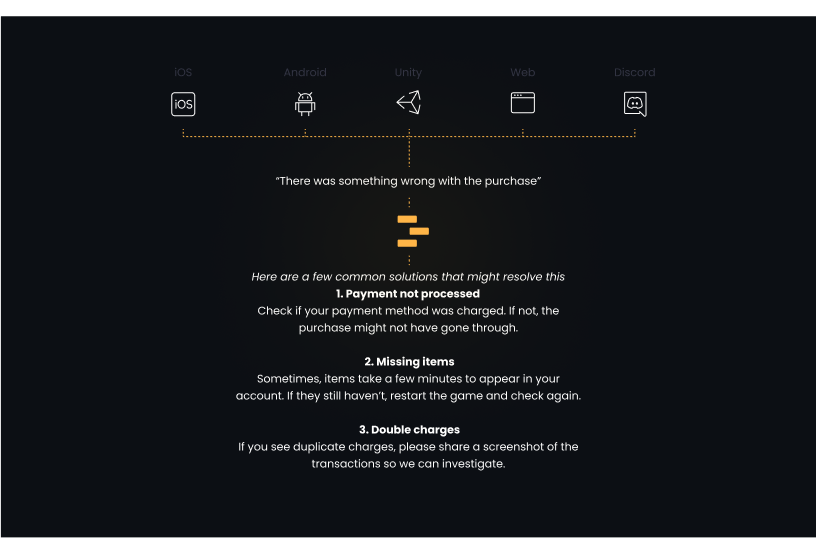
Once your content is structured, AI tools can transform how players interact with your knowledge base. For gaming companies, these tools are especially useful for addressing detailed questions about gameplay mechanics and technical issues. What makes an AI-driven knowledge base truly powerful is its ability to provide instant answers, rather than just a list of search results.
Imagine you’re at a supermarket doing your grocery shopping. You realize you’ve forgotten bananas, so you ask the cashier where to find them. The cashier could tell you they’re in a specific aisle, but instead, they hand you the exact number of bananas you need right then and there. That’s the kind of convenience and immediacy AI can bring to player support.
Platforms such as Theymes use GenAI to automatically organize and surface the right amount of bananas :).
The beauty and the beast with AI based search
Natural Language Processing (NLP) allows players to ask questions in their own words. It understands intent and delivers relevant answers, even for conversational questions like, “How do I unlock the secret level after beating the boss?” This removes the need for exact keyword matches, creating a smoother support experience.
Biggest challenge is to make the players understand that they very freely and flexibly describe their scenario. Currently this industry is far from mature and many search driven interfaces are perceived as it would return search results. The opportunity here on the other hand is that players will be very impressively surprised, when those answers are fast and accurate.
Update Content Regularly
Maintaining a gaming knowledge base requires consistent effort to ensure it stays useful and up-to-date. Gaming companies need a structured approach to keep information relevant for their players. Set a schedule for updates based on the type of content and its importance. AI tools can help simplify and speed up this process:
Content Type
Update Frequency
Priority Level
Game patches & updates
Monthly
High
Core gameplay mechanics
Quarterly
Medium
Technical requirements
Bi-annually
Medium
General information
Annually
Low
Updating regularly is just one piece of the puzzle. Listening to player feedback is equally important to keep your knowledge base aligned with what players need.
Incorporate Feedback
Player feedback helps pinpoint missing information and improve the overall quality of your content:
Feedback source
Purpose
Player interactions
Identify recurring issues and gather community input
Usage analytics
Highlight popular topics and expand key content
Using feedback, you can refine your content to better match player needs across various formats.
Use different content formats
Provide a mix of content formats to suit different learning preferences:
- Video tutorials for explaining advanced gameplay strategies
- Interactive guides for step-by-step processes
- Written articles for detailed instructions
- Visual flowcharts to assist with decision-making
Track analytics to see which formats players prefer and ensure all multimedia content is optimized for easy access on any device. Collaborating across teams can bring in fresh insights and ensure all aspects of the game are covered.
Tools and platforms for gaming knowledge bases
Once your knowledge base is organized and up-to-date, the next step is choosing tools that boost efficiency and improve player experience. Today’s platforms offer features designed to tackle the unique challenges faced by gaming companies.
Theymes is tailored for gaming companies, offering features like in-game SDKs, multilingual AI support, Discord integration, and detailed analytics. It provides flexible service tiers to suit businesses of different sizes and support needs.
Feature
What It Does for Gaming Companies
In-Game SDK
Lets players access support directly in-game
AI assistant
Handles queries automatically
Community integration
Works seamlessly with platforms like Discord
Analytics
Helps optimize support through data insights
Comparing knowledge base tools for gaming
When selecting a platform for your knowledge base, prioritize features that align with your team’s needs and goals. Here’s what to look for:
Category
Key Features to Consider
Core functionality
Search tools, content management, version tracking
Integration
Compatibility with gaming platforms, community tools, and support systems
Analytics & insights
Tracks usage and measures performance
Pick a platform that matches your support demands and scales as your company grows. It should not only complement your existing AI-driven tools but also integrate smoothly into your gaming ecosystem.
Key points for setting up a knowledge base
Next steps to take
To ensure your knowledge base stays effective, assign a dedicated team to manage content quality and regular updates. Leading gaming companies start by organizing their content into clear categories before moving on to technical solutions.
Here’s a practical roadmap to guide your setup:
Phase
Key Actions
Outcome
Initial setup
Assign team, audit content, structure categories
Builds a strong foundation for knowledge management
Technical integration
Implement AI search, choose a platform
Boosts search capabilities and user experience
Content development
Develop gaming-focused content, use varied formats
Increases self-service success rates
Optimization
Set up analytics, gather feedback
Enables continuous improvements and updates
By following these steps, you’ll create a knowledge base that adapts to your players’ changing needs.
Final thoughts
AI-powered knowledge bases are transforming how gaming companies support their players. Each step in this process adds to building a resource that grows alongside your player community.
Regular updates, diverse content formats, and advanced search tools turn your knowledge base into a powerful tool for keeping players satisfied and engaged. Focus on maintaining a system that evolves with your audience while delivering consistent, high-quality support.